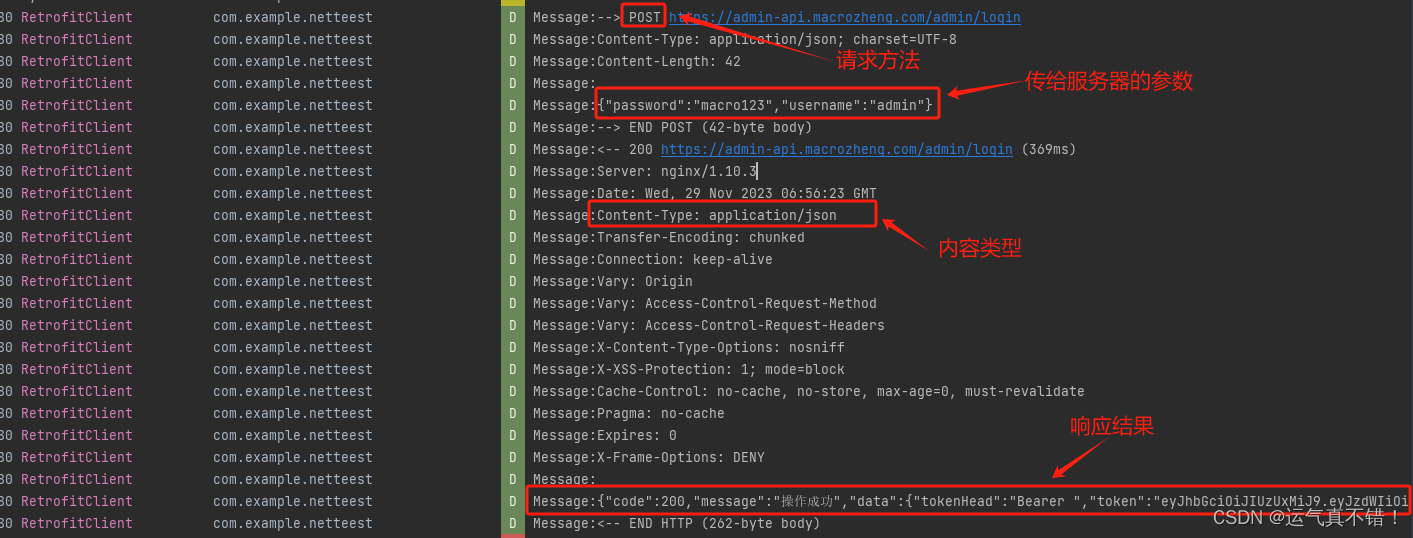
在移动端开发时,我们常常需要像web端一样可以方便地查看我们向服务器发送请求的报文详细日志(如请求地址,请求参数,请求类型,服务器响应的耗时时间,请求返回的结果等等)。
使用Retrofit时,如果我们需要打印上述的网络请求的日志,可以采用日志拦截器的方案得以实现
- 添加依赖
implementation 'com.squareup.okhttp3:logging-interceptor:5.0.0-alpha.2'
- 创建并获取OkHttp
open fun getOkHttpClient(): OkHttpClient? {//日志显示级别val level = HttpLoggingInterceptor.Level.BODY//新建log拦截器val loggingInterceptor = HttpLoggingInterceptor { message ->Log.d("RetrofitClient","Message:$message")}loggingInterceptor.level = level//定制OkHttpval httpClientBuilder = OkHttpClient.Builder()//OkHttp进行添加拦截器loggingInterceptorhttpClientBuilder.addInterceptor(loggingInterceptor)return httpClientBuilder.build()}
- 将获取到的OkHttp给Retrofit进行使用
val retrofit: Retrofit = Retrofit.Builder().client(getOkHttpClient()).addConverterFactory(GsonConverterFactory.create(getGson())).addCallAdapterFactory(RxJava2CallAdapterFactory.create()).baseUrl(BASE_URL).build()
最后效果
我发起了一个登录请求