

页面中的blockShow组件展示,可进行相关的样式修改,一般月饼图搭配使用,具体根据实际来
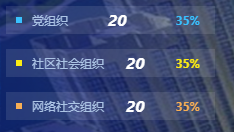
组件代码:
<template><!-- 这是新版的相对应的颜色列表的UI --><div class="bllockListShow"><div class="pieList" v-for="(item,index) in dataArr" :key="index" @click="clickUptown(index,item)":style="{height:height,marginTop:listTop,background:listBackground}"><div class="pieSquare" :style="{background:colors[index],marginTop:squareTop}"></div><div class="pieName" :style="{lineHeight:height}">{{item.name}}</div><div class="pieValue" :style="{lineHeight:height,paddingRight:paddingRight}" style="font-size:16px;font-style: oblique;">{{item.value}}</div><div class="pieValue" :style="{lineHeight:height,paddingRight:paddingRight,color:colors[index]}" v-if="isRateShow">{{item.rate}}%</div><!-- <div class="pieLine" :style="{background:colors[index],height:height}"></div> --></div></div>
</template>
<script>
export default {props:{colors:{type:Array,default:()=>[]},//数组dataArr:{type:Array,default:()=>[]},height:{type:String,default:'28px'},squareTop:{type:String,default:"11px"},listTop:{type:String,default:'15px'},paddingRight:{type:String,default:'15px'},isRateShow:{type:Boolean,default:true},listBackground:{type:String,default:'rgba(255, 255, 255, 0.1)'}},data() {return {}},methods: {},mounted(){},
}
</script>
<style lang="scss">
.bllockListShow{.pieList:first-child{margin