
)
系列文章目录
unity工具
文章目录
- 系列文章目录
- 前言
- 一、时间限制
- 1-1、代码如下:
- 二、次数限制
- 2-1、 在Unity项目中需要对注册表进行操作,还需要设置一下API兼容级别设置成 .NET Framework
- 2-2、设置如下图 Player里面
- 2-3、代码如下:
- 三、同时控制时间和次数
- 四、unity自带保存读取次数限制
- 4-1、代码如下:
- 4-2、效果
- 总结
前言
大家好,我是心疼你的一切,不定时更新Unity开发技巧,觉得有用记得一键三连哦。
在软件开发的时候,可能会遇到程序的使用次数限制,以及时间的限制,下面就写一下这两种
方法是新建注册表,增加键值对,修改键值,完成对程序的控制
提示:以下是本篇文章正文内容,下面案例可供参考
一、时间限制
修改脚本里面的startTime和endTime即可
1-1、代码如下:
using System;
using System.Collections;
using System.Collections.Generic;
using UnityEngine;public class Time_Restrict : MonoBehaviour
{//用户是否超过使用日期bool Islate = false;// Use this for initializationvoid Start(){//===(比如2月1日开始计算,到2月8日结束)//小于minTime 时间或者大于maxTime时间 ,将不可使用DateTime startTime = Convert.ToDateTime("2024-2-1 16:29:00");DateTime endTime = Convert.ToDateTime("2024-2-8 16:29:00");if (startTime > DateTime.Now || DateTime.Now > endTime){//不在使用时间内,会直接退出程序Islate = true;}SetPlayTime();}/// <summary>/// 设置用户使用次数/// </summary>void SetPlayTime(){//异常捕捉,如果发生异常,比如闪退,限制改为falsetry{//限制使用时间,如果不在这个区间内,直接退出程序if (Islate){Debug.Log("超时间了");Invoke("OnExit", 2);//延时退出,可在退出前显示提示消息}}catch{Islate = false;}}//退出程序private void OnExit(){Application.Quit();}
}
但是有个小弊端,用户改了系统时间,软件就可以使用了,但也是只能在设置时间区间内使用。
二、次数限制
2-1、 在Unity项目中需要对注册表进行操作,还需要设置一下API兼容级别设置成 .NET Framework
2-2、设置如下图 Player里面
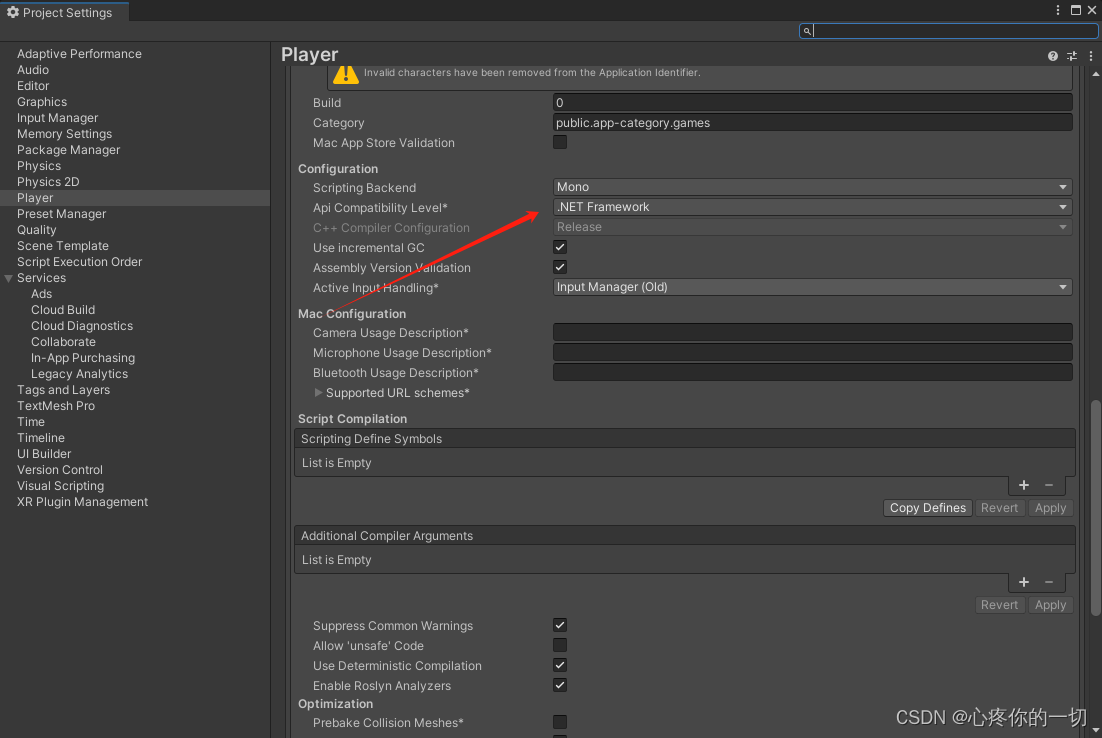
具体想写到哪个注册表,可以自行设置名称
2-3、代码如下:
using System.Collections;
using System.Collections.Generic;
using UnityEngine;
using Microsoft.Win32;
public class Frequency_Restrict : MonoBehaviour
{//最大使用次数int MaxUsageCount = 3;/// <summary>/// 如果想刷新次数,直接换一个键值名称就行了 老:UseTime1  新:UseTime2/// </summary>void Start(){SetPlayFrequency();}/// <summary>/// 设置用户使用次数/// </summary>void SetPlayFrequency(){//创建键值对RegistryKey RootKey, RegKey;//项名为:HKEY_CURRENT_USER\SoftwareRootKey = Registry.CurrentUser.OpenSubKey("SOFTWARE", true);//打开子项:HKEY_CURRENT_USER\Software\MyRegDataAppif ((RegKey = RootKey.OpenSubKey("TestToControlUseTime", true)) == null){RootKey.CreateSubKey("TestToControlUseTime");               //不存在,则创建子项RegKey = RootKey.OpenSubKey("TestToControlUseTime", true);  //打开键值RegKey.SetValue("UseTime1", (object)MaxUsageCount);         //创建键值,存储最大可使用次数return;}//异常捕捉,如果出现程序异常,比如闪退,次数更新为开始设置的最大使用次数try{object usetime = RegKey.GetValue("UseTime1");        //读取键值,可使用次数print("还可以使用:" + usetime + "次");//使用次数减1int newtime = int.Parse(usetime.ToString()) - 1;if (newtime < 0){//到期退出程序RegKey.SetValue("UseTime1", (object)newtime);Invoke("OnExit", 2);//延时退出,可在退出前显示提示消息}else{RegKey.SetValue("UseTime1", (object)newtime);    //更新键值,可使用次数减1}}catch{RegKey.SetValue("UseTime1", (object)MaxUsageCount);print("更新使用次数");}}/// <summary>/// 退出程序/// </summary>private void OnExit(){Application.Quit();}
}
注册表这种比较保险一点,但是也是可以破解的,注册表好像重装系统就没有了
三、同时控制时间和次数
1.两种放一起实现效果更好用
代码如下:
using Microsoft.Win32;
using System;
using System.Collections;
using System.Collections.Generic;
using UnityEngine;public class Merge_Controller : MonoBehaviour
{//用户是否超过使用日期bool Islate = false;//最大使用次数int MaxUsageCount = 3;// Use this for initializationvoid Start(){//===(比如2月1日开始计算,到2月8日结束)//小于minTime 时间或者大于maxTime时间 ,将不可使用DateTime startTime = Convert.ToDateTime("2024-2-1 16:29:00");DateTime endTime = Convert.ToDateTime("2024-2-8 16:29:00");if (startTime > DateTime.Now || DateTime.Now > endTime){//不在使用时间内,会直接退出程序Islate = true;}SetPlaymerge();}void SetPlaymerge(){//创建键值对RegistryKey RootKey, RegKey;//项名为:HKEY_CURRENT_USER\SoftwareRootKey = Registry.CurrentUser.OpenSubKey("SOFTWARE", true);//打开子项:HKEY_CURRENT_USER\Software\MyRegDataAppif ((RegKey = RootKey.OpenSubKey("TestToControlUseTime", true)) == null){RootKey.CreateSubKey("TestToControlUseTime");               //不存在,则创建子项RegKey = RootKey.OpenSubKey("TestToControlUseTime", true);  //打开键值RegKey.SetValue("UseTime1", (object)MaxUsageCount);         //创建键值,存储最大可使用次数return;}//异常捕捉,如果出现程序异常,比如闪退,次数更新为开始设置的最大使用次数try{object usetime = RegKey.GetValue("UseTime1");        //读取键值,可使用次数print("还可以使用:" + usetime + "次");//使用次数减1int newtime = int.Parse(usetime.ToString()) - 1;if (newtime < 0|| Islate){//到期退出程序RegKey.SetValue("UseTime1", (object)newtime);Invoke("OnExit", 2);//延时退出,可在退出前显示提示消息}else{RegKey.SetValue("UseTime1", (object)newtime);    //更新键值,可使用次数减1}}catch{RegKey.SetValue("UseTime1", (object)MaxUsageCount);print("更新使用次数");}}/// <summary>/// 退出程序/// </summary>private void OnExit(){Application.Quit();}
}
四、unity自带保存读取次数限制
1、用的是unity自带的保存和读取
4-1、代码如下:
using System.Collections;
using System.Collections.Generic;
using UnityEngine;public class UnitySetMassage : MonoBehaviour
{private int intflage = 3;private  int intisbool = 0;// Start is called before the first frame updatevoid Start(){//PlayerPrefs.DeleteAll();判断有没有这个键值if (PlayerPrefs.HasKey("csxz")){intisbool = PlayerPrefs.GetInt("csxz");Debug.Log("还有几次:" + intisbool);if (intisbool <=0){Debug.Log("结束");Application.Quit();}}else{PlayerPrefs.SetInt("csxz", intflage);intisbool = intflage;}}//退出程序时保存private void OnApplicationQuit(){if (PlayerPrefs.HasKey("csxz")){intisbool--;PlayerPrefs.SetInt("csxz", intisbool);Debug.Log("还剩几次:" + intisbool);}}// Update is called once per framevoid Update(){}
}
4-2、效果
打印效果就不录视频了,感兴趣的话请自行测试一下吧,我把测试的打印出来
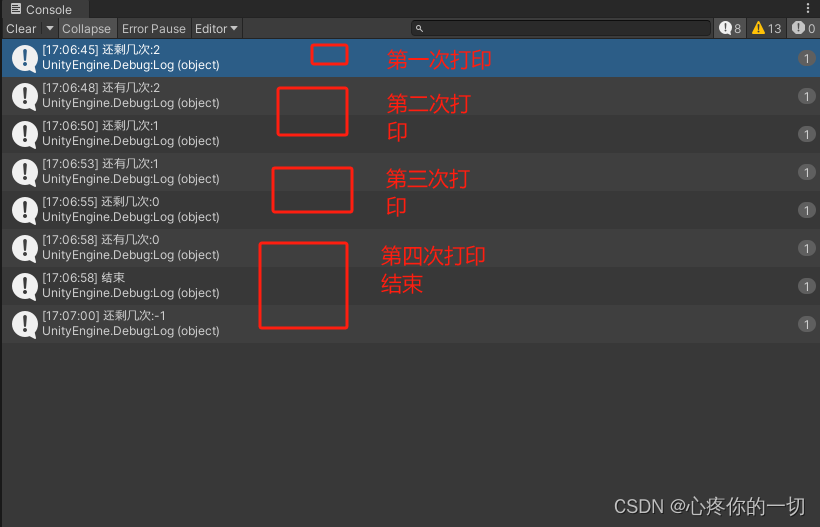
总结
以上就是讲了两种限制方法
不定时更新Unity开发技巧,觉得有用记得一键三连哦。