源代码:
// 封装倒计时逻辑函数
import { computed, ref } from 'vue'
import dayjs from 'dayjs'
export const useCountDown = () => {// 1.响应式数据const time = ref(0)// 格式化时间const formatTime = computed(()=>dayjs.unix(time.value).format('mm分ss秒'))// 2.开始倒计时的函数const start = (currentTime) => {// 倒计时逻辑formatTime.value = currentTime setInterval(() => {formatTime.value--}, 1000);}return {formatTime,start}
}
解析:
上述代码中的错误 Write operation failed: computed value is readonly 是因为尝试直接修改一个 computed 属性的值。在 Vue 3 中,computed 属性是只读的,不能直接给它赋值。修复这个问题,需要通过修改底层响应式数据来影响 computed 属性的值。在useCountDown 钩子中,直接修改 time 引用的值,而不是尝试修改 formatTime。formatTime 会根据 time 的变化自动更新。
更改后代码:
将上述代码中待修改的formatTime该为time即可,用time改变,formatTIme承接数据
import { ref, computed, onUnmounted } from 'vue';
import dayjs from 'dayjs';  export const useCountDown = () => {  // 1. 响应式数据  const time = ref(0); // 倒计时秒数  // 2. 计算属性,用于格式化时间  const formatTime = computed(() => dayjs.unix(time.value).format('mm:ss'));  // 3. 开始倒计时的函数  const start = (totalSeconds) => {  time.value = totalSeconds; // 设置初始倒计时时间  const intervalId = setInterval(() => {  if (time.value > 0) {  time.value--; // 每秒减少1  } else {  clearInterval(intervalId); // 时间到,清除定时器  }  }, 1000);  // 组件卸载时清除定时器  onUnmounted(() => {  clearInterval(intervalId);  });  };  // 4. 重置倒计时的函数  const reset = (totalSeconds) => {  time.value = totalSeconds; // 重置倒计时时间  };  return {  formatTime,  start,  reset // 可以选择性地暴露 reset 函数  };
};
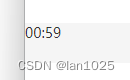
结果展示: