

目前前端中默认自带的input调色板效果和功能都很一般,所以做了一个稍微好用点的调色板,下面我提供了两个版本,一个是纯html、js实现的,一个是转成了Vue3版本,如果您需要其他版本,可以直接评论哦,觉得好用的话,麻烦点个赞哦
功能如图所示,看是否满足您需求
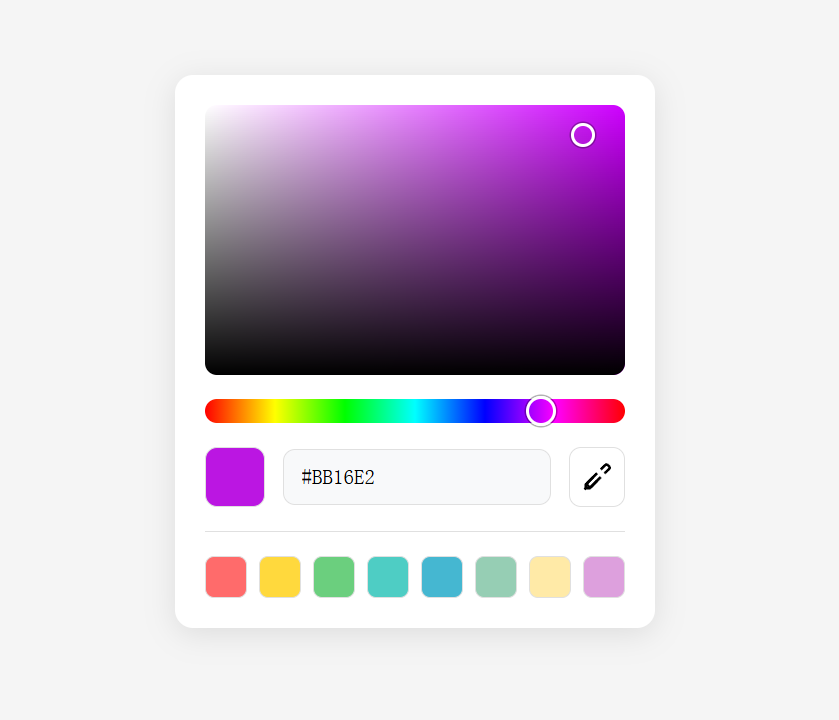
1.html版本代码(下面有Vue3版本代码)
<!DOCTYPE html>
<html lang="zh-CN">
<head><meta charset="UTF-8"><meta name="viewport" content="width=device-width, initial-scale=1.0"><title>调色板</title><style>* {margin: 0;padding: 0;box-sizing: border-box;}body {font-family: -apple-system, BlinkMacSystemFont, 'Segoe UI', Roboto, sans-serif;background: #f5f5f5;padding: 20px;display: flex;justify-content: center;align-items: center;min-height: 100vh;}.color-picker {background: white;border-radius: 12px;padding: 20px;box-shadow: 0 4px 20px rgba(0, 0, 0, 0.1);width: 320px;}.color-area {position: relative;width: 280px;height: 180px;border-radius: 8px;overflow: hidden;margin-bottom: 16px;cursor: crosshair;background: linear-gradient(to right, #ffffff, #ff0000);}.color-area::before {content: '';position: absolute;top: 0;left: 0;right: 0;bottom: 0;background: linear-gradient(to bottom, rgba(0, 0, 0, 0), rgba(0, 0, 0, 1));}.color-area-pointer {position: absolute;width: 16px;height: 16px;border: 2px solid white;border-radius: 50%;box-shadow: 0 0 0 1px rgba(0, 0, 0, 0.3);transform: translate(-50%, -50%);pointer-events: none;}.hue-slider {position: relative;width: 280px;height: 16px;border-radius: 8px;margin-bottom: 16px;background: linear-gradient(to right, #ff0000 0%, #ffff00 16.66%, #00ff00 33.33%, #00ffff 50%, #0000ff 66.66%, #ff00ff 83.33%, #ff0000 100%);cursor: pointer;}.hue-pointer {position: absolute;width: 20px;height: 20px;border: 2px solid white;border-radius: 50%;box-shadow: 0 0 0 1px rgba(0, 0, 0, 0.3);transform: translate(-50%, -50%);top: 50%;pointer-events: none;}.color-input-container {display: flex;align-items: center;gap: 12px;}.color-preview {width: 40px;height: 40px;border-radius: 8px;border: 1px solid #e0e0e0;flex-shrink: 0;}.color-input {flex: 1;padding: 10px 12px;border: 1px solid #e0e0e0;border-radius: 8px;font-size: 14px;font-family: monospace;background: #f8f9fa;}.color-input:focus {outline: none;border-color: #007aff;}.eyedropper-btn {width: 40px;height: 40px;border: 1px solid #e0e0e0;border-radius: 8px;background: white;cursor: pointer;display: flex;align-items: center;justify-content: center;transition: all 0.2s;}.eyedropper-btn:hover {background: #f0f0f0;}.eyedropper-btn svg {width: 20px;height: 20px;}.color-swatches {display: grid;grid-template-columns: repeat(8, 1fr);gap: 8px;margin-top: 16px;padding-top: 16px;border-top: 1px solid #e0e0e0;}.color-swatch {width: 28px;height: 28px;border-radius: 6px;border: 1px solid #e0e0e0;cursor: pointer;transition: transform 0.1s;}.color-swatch:hover {transform: scale(1.1);}</style>
</head>
<body><div class="color-picker"><div class="color-area" id="colorArea"><div class="color-area-pointer" id="colorPointer"></div></div><div class="hue-slider" id="hueSlider"><div class="hue-pointer" id="huePointer"></div></div><div class="color-input-container"><div class="color-preview" id="colorPreview"></div><input type="text" class="color-input" id="colorInput" value="#7273FF" placeholder="#000000"><button class="eyedropper-btn" id="eyedropperBtn" title="取色器"><svg viewBox="0 0 24 24" fill="none" stroke="currentColor" stroke-width="2"><path d="m2 22 1-1h3l9-9"/><path d="M3 21v-3l9-9"/><path d="m15 6 3.5-3.5a1.5 1.5 0 0 1 2.12 0l1.06 1.06a1.5 1.5 0 0 1 0 2.12L18 9"/><path d="M9 12 4.5 16.5a1.5 1.5 0 0 0 0 2.12l1.06 1.06a1.5 1.5 0 0 0 2.12 0L12 15"/></svg></button></div><div class="color-swatches"><div class="color-swatch" style="background-color: #ff6b6b;" data-color="#ff6b6b"></div><div class="color-swatch" style="background-color: #ffd93d;" data-color="#ffd93d"></div><div class="color-swatch" style="background-color: #6bcf7e;" data-color="#6bcf7e"></div><div class="color-swatch" style="background-color: #4ecdc4;" data-color="#4ecdc4"></div><div class="color-swatch" style="background-color: #45b7d1;" data-color="#45b7d1"></div><div class="color-swatch" style="background-color: #96ceb4;" data-color="#96ceb4"></div><div class="color-swatch" style="background-color: #ffeaa7;" data-color="#ffeaa7"></div><div class="color-swatch" style="background-color: #dda0dd;" data-color="#dda0dd"></div></div></div><script>class ColorPicker {constructor() {this.colorArea = document.getElementById('colorArea');this.colorPointer = document.getElementById('colorPointer');this.hueSlider = document.getElementById('hueSlider');this.huePointer = document.getElementById('huePointer');this.colorInput = document.getElementById('colorInput');this.colorPreview = document.getElementById('colorPreview');this.eyedropperBtn = document.getElementById('eyedropperBtn');this.isDragging = false;this.isHueDragging = false;this.currentHue = 240; // 对应 #7273FFthis.currentSaturation = 100;this.currentValue = 100;this.init();}init() {this.updateColorArea();this.updatePointerPositions();this.updateColorDisplay();this.bindEvents();}bindEvents() {// 颜色区域拖拽this.colorArea.addEventListener('mousedown', (e) => this.startColorDrag(e));document.addEventListener('mousemove', (e) => this.onColorDrag(e));document.addEventListener('mouseup', () => this.endColorDrag());// 色调滑块拖拽this.hueSlider.addEventListener('mousedown', (e) => this.startHueDrag(e));document.addEventListener('mousemove', (e) => this.onHueDrag(e));document.addEventListener('mouseup', () => this.endHueDrag());// 输入框变化this.colorInput.addEventListener('blur', (e) => this.onInputChange(e));this.colorInput.addEventListener('keydown', (e) => this.onInputKeydown(e));// 取色器按钮this.eyedropperBtn.addEventListener('click', () => this.openEyedropper());// 色样点击document.querySelectorAll('.color-swatch').forEach(swatch => {swatch.addEventListener('click', (e) => {const color = e.target.dataset.color;this.setColor(color);});});}startColorDrag(e) {this.isDragging = true;this.updateColorFromPosition(e);}onColorDrag(e) {if (!this.isDragging) return;this.updateColorFromPosition(e);}endColorDrag() {this.isDragging = false;}updateColorFromPosition(e) {const rect = this.colorArea.getBoundingClientRect();const x = Math.max(0, Math.min(rect.width, e.clientX - rect.left));const y = Math.max(0, Math.min(rect.height, e.clientY - rect.top));// 修正:使用HSV模型而不是HSL// x轴代表饱和度(0-100),y轴代表明度(100-0)this.currentSaturation = (x / rect.width) * 100;this.currentValue = (1 - y / rect.height) * 100;this.updateColorDisplay();this.updatePointerPositions();}startHueDrag(e) {this.isHueDragging = true;this.updateHueFromPosition(e);}onHueDrag(e) {if (!this.isHueDragging) return;this.updateHueFromPosition(e);}endHueDrag() {this.isHueDragging = false;}updateHueFromPosition(e) {const rect = this.hueSlider.getBoundingClientRect();const x = Math.max(0, Math.min(rect.width, e.clientX - rect.left));this.currentHue = (x / rect.width) * 360;this.updateColorArea();this.updateColorDisplay();this.updatePointerPositions();}updateColorArea() {// 获取当前色调的纯色const hueColor = this.hsvToHex(this.currentHue, 100, 100);this.colorArea.style.background = `linear-gradient(to right, #ffffff, ${hueColor})`;}updateColorDisplay() {const color = this.hsvToHex(this.currentHue, this.currentSaturation, this.currentValue);this.colorPreview.style.backgroundColor = color;// 只有在输入框没有焦点时才更新输入框的值if (document.activeElement !== this.colorInput) {this.colorInput.value = color;}}updatePointerPositions() {// 更新颜色区域指针const colorRect = this.colorArea.getBoundingClientRect();const colorX = (this.currentSaturation / 100) * colorRect.width;const colorY = (1 - this.currentValue / 100) * colorRect.height;this.colorPointer.style.left = `${colorX}px`;this.colorPointer.style.top = `${colorY}px`;// 更新色调滑块指针const hueRect = this.hueSlider.getBoundingClientRect();const hueX = (this.currentHue / 360) * hueRect.width;this.huePointer.style.left = `${hueX}px`;}onInputChange(e) {const color = e.target.value.trim();if (color === '') {return;}if (this.isValidHex(color)) {this.setColor(color);} else {// 如果输入无效,恢复到当前颜色const currentColor = this.hsvToHex(this.currentHue, this.currentSaturation, this.currentValue);e.target.value = currentColor;}}onInputKeydown(e) {if (e.key === 'Enter') {this.onInputChange(e);}}setColor(hexColor) {const hsv = this.hexToHsv(hexColor);this.currentHue = hsv.h;this.currentSaturation = hsv.s;this.currentValue = hsv.v;this.updateColorArea();this.updateColorDisplay();this.updatePointerPositions();}async openEyedropper() {if ('EyeDropper' in window) {try {const eyeDropper = new EyeDropper();const result = await eyeDropper.open();this.setColor(result.sRGBHex);} catch (e) {console.log('取色器取消或出错');}} else {alert('您的浏览器不支持取色器功能');}}// 使用HSV颜色模型的转换函数hsvToHex(h, s, v) {h = h % 360;s = Math.max(0, Math.min(100, s)) / 100;v = Math.max(0, Math.min(100, v)) / 100;const c = v * s;const x = c * (1 - Math.abs(((h / 60) % 2) - 1));const m = v - c;let r, g, b;if (h >= 0 && h < 60) {r = c; g = x; b = 0;} else if (h >= 60 && h < 120) {r = x; g = c; b = 0;} else if (h >= 120 && h < 180) {r = 0; g = c; b = x;} else if (h >= 180 && h < 240) {r = 0; g = x; b = c;} else if (h >= 240 && h < 300) {r = x; g = 0; b = c;} else {r = c; g = 0; b = x;}r = Math.round((r + m) * 255);g = Math.round((g + m) * 255);b = Math.round((b + m) * 255);return `#${r.toString(16).padStart(2, '0')}${g.toString(16).padStart(2, '0')}${b.toString(16).padStart(2, '0')}`.toUpperCase();}hexToHsv(hex) {if (!this.isValidHex(hex)) {return { h: 0, s: 0, v: 0 };}// 处理3位hex格式if (hex.length === 4) {hex = '#' + hex[1] + hex[1] + hex[2] + hex[2] + hex[3] + hex[3];}const r = parseInt(hex.slice(1, 3), 16) / 255;const g = parseInt(hex.slice(3, 5), 16) / 255;const b = parseInt(hex.slice(5, 7), 16) / 255;const max = Math.max(r, g, b);const min = Math.min(r, g, b);const diff = max - min;let h = 0;let s = max === 0 ? 0 : diff / max;let v = max;if (diff !== 0) {if (max === r) {h = ((g - b) / diff) % 6;} else if (max === g) {h = (b - r) / diff + 2;} else {h = (r - g) / diff + 4;}h *= 60;}if (h < 0) h += 360;return {h: Math.round(h),s: Math.round(s * 100),v: Math.round(v * 100)};}isValidHex(hex) {return /^#([A-Fa-f0-9]{6}|[A-Fa-f0-9]{3})$/.test(hex);}}// 初始化调色板new ColorPicker();</script>
</body>
</html>
Vue3版本代码
<template><div class="color-picker"><div class="color-area" ref="colorAreaRef"@mousedown="startColorDrag":style="{ background: colorAreaBackground }"><div class="color-area-overlay"></div><div class="color-area-pointer" ref="colorPointerRef":style="{ left: colorPointerPosition.x + 'px', top: colorPointerPosition.y + 'px' }"></div></div><div class="hue-slider" ref="hueSliderRef"@mousedown="startHueDrag"><div class="hue-pointer" ref="huePointerRef":style="{ left: huePointerPosition + 'px' }"></div></div><div class="color-input-container"><div class="color-preview" :style="{ backgroundColor: currentColor }"></div><input type="text" class="color-input" v-model="colorInputValue"@blur="onInputChange"@keydown="onInputKeydown"placeholder="#000000"/><button class="eyedropper-btn" @click="openEyedropper"title="取色器"><svg viewBox="0 0 24 24" fill="none" stroke="currentColor" stroke-width="2"><path d="m2 22 1-1h3l9-9"/><path d="M3 21v-3l9-9"/><path d="m15 6 3.5-3.5a1.5 1.5 0 0 1 2.12 0l1.06 1.06a1.5 1.5 0 0 1 0 2.12L18 9"/><path d="M9 12 4.5 16.5a1.5 1.5 0 0 0 0 2.12l1.06 1.06a1.5 1.5 0 0 0 2.12 0L12 15"/></svg></button></div><div class="color-swatches"><div v-for="color in colorSwatches" :key="color"class="color-swatch" :style="{ backgroundColor: color }"@click="setColor(color)"></div></div></div>
</template><script setup>
import { ref, reactive, computed, onMounted, onUnmounted, nextTick } from 'vue'// Props
const props = defineProps({modelValue: {type: String,default: '#7273FF'}
})// Emits
const emit = defineEmits(['update:modelValue'])// Refs
const colorAreaRef = ref(null)
const colorPointerRef = ref(null)
const hueSliderRef = ref(null)
const huePointerRef = ref(null)// Reactive state
const state = reactive({isDragging: false,isHueDragging: false,currentHue: 240,currentSaturation: 100,currentValue: 100
})// Color input value
const colorInputValue = ref(props.modelValue)// Color swatches
const colorSwatches = ref(['#ff6b6b', '#ffd93d', '#6bcf7e', '#4ecdc4','#45b7d1', '#96ceb4', '#ffeaa7', '#dda0dd'
])// Computed properties
const currentColor = computed(() => {return hsvToHex(state.currentHue, state.currentSaturation, state.currentValue)
})const colorAreaBackground = computed(() => {const hueColor = hsvToHex(state.currentHue, 100, 100)return `linear-gradient(to right, #ffffff, ${hueColor})`
})const colorPointerPosition = computed(() => {if (!colorAreaRef.value) return { x: 0, y: 0 }const rect = colorAreaRef.value.getBoundingClientRect()const x = (state.currentSaturation / 100) * rect.widthconst y = (1 - state.currentValue / 100) * rect.heightreturn { x, y }
})const huePointerPosition = computed(() => {if (!hueSliderRef.value) return 0const rect = hueSliderRef.value.getBoundingClientRect()return (state.currentHue / 360) * rect.width
})// Methods
const startColorDrag = (e) => {state.isDragging = trueupdateColorFromPosition(e)document.addEventListener('mousemove', onColorDrag)document.addEventListener('mouseup', endColorDrag)
}const onColorDrag = (e) => {if (!state.isDragging) returnupdateColorFromPosition(e)
}const endColorDrag = () => {state.isDragging = falsedocument.removeEventListener('mousemove', onColorDrag)document.removeEventListener('mouseup', endColorDrag)
}const updateColorFromPosition = (e) => {if (!colorAreaRef.value) returnconst rect = colorAreaRef.value.getBoundingClientRect()const x = Math.max(0, Math.min(rect.width, e.clientX - rect.left))const y = Math.max(0, Math.min(rect.height, e.clientY - rect.top))state.currentSaturation = (x / rect.width) * 100state.currentValue = (1 - y / rect.height) * 100updateColorValue()
}const startHueDrag = (e) => {state.isHueDragging = trueupdateHueFromPosition(e)document.addEventListener('mousemove', onHueDrag)document.addEventListener('mouseup', endHueDrag)
}const onHueDrag = (e) => {if (!state.isHueDragging) returnupdateHueFromPosition(e)
}const endHueDrag = () => {state.isHueDragging = falsedocument.removeEventListener('mousemove', onHueDrag)document.removeEventListener('mouseup', endHueDrag)
}const updateHueFromPosition = (e) => {if (!hueSliderRef.value) returnconst rect = hueSliderRef.value.getBoundingClientRect()const x = Math.max(0, Math.min(rect.width, e.clientX - rect.left))state.currentHue = (x / rect.width) * 360updateColorValue()
}const updateColorValue = () => {const color = currentColor.valuecolorInputValue.value = coloremit('update:modelValue', color)
}const onInputChange = () => {const color = colorInputValue.value.trim()if (color === '') returnif (isValidHex(color)) {setColor(color)} else {// 如果输入无效,恢复到当前颜色colorInputValue.value = currentColor.value}
}const onInputKeydown = (e) => {if (e.key === 'Enter') {onInputChange()}
}const setColor = (hexColor) => {const hsv = hexToHsv(hexColor)state.currentHue = hsv.hstate.currentSaturation = hsv.sstate.currentValue = hsv.vcolorInputValue.value = hexColoremit('update:modelValue', hexColor)
}const openEyedropper = async () => {if ('EyeDropper' in window) {try {const eyeDropper = new EyeDropper()const result = await eyeDropper.open()setColor(result.sRGBHex)} catch (e) {console.log('取色器取消或出错')}} else {alert('您的浏览器不支持取色器功能')}
}// Color conversion utilities
const hsvToHex = (h, s, v) => {h = h % 360s = Math.max(0, Math.min(100, s)) / 100v = Math.max(0, Math.min(100, v)) / 100const c = v * sconst x = c * (1 - Math.abs(((h / 60) % 2) - 1))const m = v - clet r, g, bif (h >= 0 && h < 60) {r = c; g = x; b = 0} else if (h >= 60 && h < 120) {r = x; g = c; b = 0} else if (h >= 120 && h < 180) {r = 0; g = c; b = x} else if (h >= 180 && h < 240) {r = 0; g = x; b = c} else if (h >= 240 && h < 300) {r = x; g = 0; b = c} else {r = c; g = 0; b = x}r = Math.round((r + m) * 255)g = Math.round((g + m) * 255)b = Math.round((b + m) * 255)return `#${r.toString(16).padStart(2, '0')}${g.toString(16).padStart(2, '0')}${b.toString(16).padStart(2, '0')}`.toUpperCase()
}const hexToHsv = (hex) => {if (!isValidHex(hex)) {return { h: 0, s: 0, v: 0 }}// 处理3位hex格式if (hex.length === 4) {hex = '#' + hex[1] + hex[1] + hex[2] + hex[2] + hex[3] + hex[3]}const r = parseInt(hex.slice(1, 3), 16) / 255const g = parseInt(hex.slice(3, 5), 16) / 255const b = parseInt(hex.slice(5, 7), 16) / 255const max = Math.max(r, g, b)const min = Math.min(r, g, b)const diff = max - minlet h = 0let s = max === 0 ? 0 : diff / maxlet v = maxif (diff !== 0) {if (max === r) {h = ((g - b) / diff) % 6} else if (max === g) {h = (b - r) / diff + 2} else {h = (r - g) / diff + 4}h *= 60}if (h < 0) h += 360return {h: Math.round(h),s: Math.round(s * 100),v: Math.round(v * 100)}
}const isValidHex = (hex) => {return /^#([A-Fa-f0-9]{6}|[A-Fa-f0-9]{3})$/.test(hex)
}// Initialize
onMounted(() => {// 初始化颜色if (props.modelValue) {setColor(props.modelValue)}
})// Watch for prop changes
const updateFromProp = (newValue) => {if (newValue && newValue !== currentColor.value) {setColor(newValue)}
}// Watch modelValue changes
import { watch } from 'vue'
watch(() => props.modelValue, updateFromProp)
</script><style scoped>
.color-picker {background: white;border-radius: 12px;padding: 20px;box-shadow: 0 4px 20px rgba(0, 0, 0, 0.1);width: 320px;font-family: -apple-system, BlinkMacSystemFont, 'Segoe UI', Roboto, sans-serif;
}.color-area {position: relative;width: 280px;height: 180px;border-radius: 8px;overflow: hidden;margin-bottom: 16px;cursor: crosshair;background: linear-gradient(to right, #ffffff, #ff0000);
}.color-area-overlay {position: absolute;top: 0;left: 0;right: 0;bottom: 0;background: linear-gradient(to bottom, rgba(0, 0, 0, 0), rgba(0, 0, 0, 1));pointer-events: none;
}.color-area-pointer {position: absolute;width: 16px;height: 16px;border: 2px solid white;border-radius: 50%;box-shadow: 0 0 0 1px rgba(0, 0, 0, 0.3);transform: translate(-50%, -50%);pointer-events: none;
}.hue-slider {position: relative;width: 280px;height: 16px;border-radius: 8px;margin-bottom: 16px;background: linear-gradient(to right, #ff0000 0%, #ffff00 16.66%, #00ff00 33.33%, #00ffff 50%, #0000ff 66.66%, #ff00ff 83.33%, #ff0000 100%);cursor: pointer;
}.hue-pointer {position: absolute;width: 20px;height: 20px;border: 2px solid white;border-radius: 50%;box-shadow: 0 0 0 1px rgba(0, 0, 0, 0.3);transform: translate(-50%, -50%);top: 50%;pointer-events: none;
}.color-input-container {display: flex;align-items: center;gap: 12px;
}.color-preview {width: 40px;height: 40px;border-radius: 8px;border: 1px solid #e0e0e0;flex-shrink: 0;
}.color-input {flex: 1;padding: 10px 12px;border: 1px solid #e0e0e0;border-radius: 8px;font-size: 14px;font-family: monospace;background: #f8f9fa;
}.color-input:focus {outline: none;border-color: #007aff;
}.eyedropper-btn {width: 40px;height: 40px;border: 1px solid #e0e0e0;border-radius: 8px;background: white;cursor: pointer;display: flex;align-items: center;justify-content: center;transition: all 0.2s;
}.eyedropper-btn:hover {background: #f0f0f0;
}.eyedropper-btn svg {width: 20px;height: 20px;
}.color-swatches {display: grid;grid-template-columns: repeat(8, 1fr);gap: 8px;margin-top: 16px;padding-top: 16px;border-top: 1px solid #e0e0e0;
}.color-swatch {width: 28px;height: 28px;border-radius: 6px;border: 1px solid #e0e0e0;cursor: pointer;transition: transform 0.1s;
}.color-swatch:hover {transform: scale(1.1);
}
</style>