

提示:文章写完后,目录可以自动生成,如何生成可参考右边的帮助文档
文章目录
- 1.常用属性
- 2.SQL定义标签
- 2.1 select
- 2.2 insert
- 2.3 update
- 2.4 delete
- 2.5 resultMap
- 2.6 sql
- 3.SQL动态标签
- 3.1 if
- 3.2 ==foreach==
- 3.2.1 批量插入表数据
- 3.2.2 批量更新表数据
- 3.2.3 批量查询表数据
- 3.3 choose/when/otherwise
- 3.4 where
- 修改为:==< where>==
- 3.5 set
- 3.6 trim
- 3.6.1 在select中
- 3.6.2 用在insert中
- 3.6.3 在update中
1.常用属性
| 属性 | 描述 |
|---|---|
| id | 在命名空间中唯一的标识符,被用来引用这条语句 |
| parameterType | 传入这条语句的参数的类全限定名或别名 |
| resultType | 期望从这条语句中返回结果的类全限定名或别名,resultType 和 resultMap 之间只能同时使用一个 |
| resultMap | 在命名空间中唯一的标识符,被用来引用这条语句 ,resultType 和 resultMap 之间只能同时使用一个 |
| flushCache | 将其设置为 true 后,只要语句被调用,都会导致本地缓存和二级缓存被清空,默认值:对于(select语句)false ;对于( insert、update 和 delete 语句)true |
| useCache | 将其设置为 true 后,将会导致本条语句的结果被二级缓存缓存起来,默认值:对于(select语句)为 true |
| useGeneratedKeys | (仅适用于 insert 和 update)这会令 MyBatis 使用 JDBC 的 getGeneratedKeys 方法来取出由数据库内部生成的主键(比如:像 MySQL 和 SQL Server 这样的关系型数据库管理系统的自动递增字段),默认值:false |
| keyProperty | (仅适用于 insert 和 update)指定能够唯一识别对象的属性,MyBatis 会使用 getGeneratedKeys 的返回值或 insert 语句的 selectKey 子元素设置它的值,默认值:未设置(unset) |
2.SQL定义标签
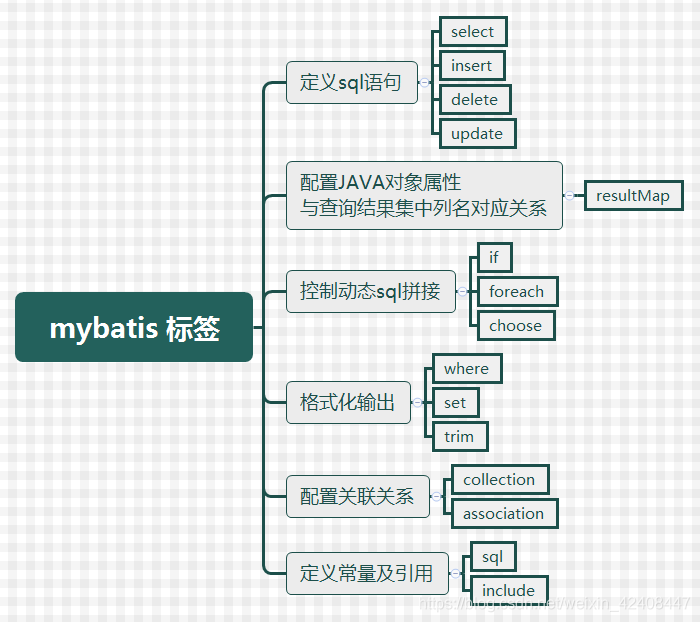
2.1 select
用于数据查询操作,例:
<select id="selectUserInfo" parameterType="int" resultType="map">select * from user_info where id=#{keyId}
</select>
属性介绍:
- id :唯一的标识符.
- parameterType:传给此语句的参数的全路径名或别名 例:com.test.poso.User或user
- resultType :语句返回值类型或别名。注意,如果是集合,那么这里填写的是集合的泛型,而不是集合本身(resultType 与resultMap 不能并用)
2.2 insert
用于数据保存操作,例:
<insert id="insertUserInfo" parameterType="map" useGeneratedKeys="true" keyProperty="keyId">insert into user_info (userName,userSex)values(#{userName},#{userSex})
</insert>
属性介绍:
- id :唯一的标识符
- parameterType:传给此语句的参数的全路径名或别名 例:com.test.poso.User
PS:keyProperty属性可返回此条插入数据的主键值
2.3 update
用于数据更新操作,例:
<update id="updateUserInfo" parameterType="map">update  user_infoset userName=#{userName}where id=#{keyId}
</update>
2.4 delete
用于数据删除操作,例:
<delete id="selectUserInfo" parameterType="int">delete  from user_info where id=#{keyId}
</delete>
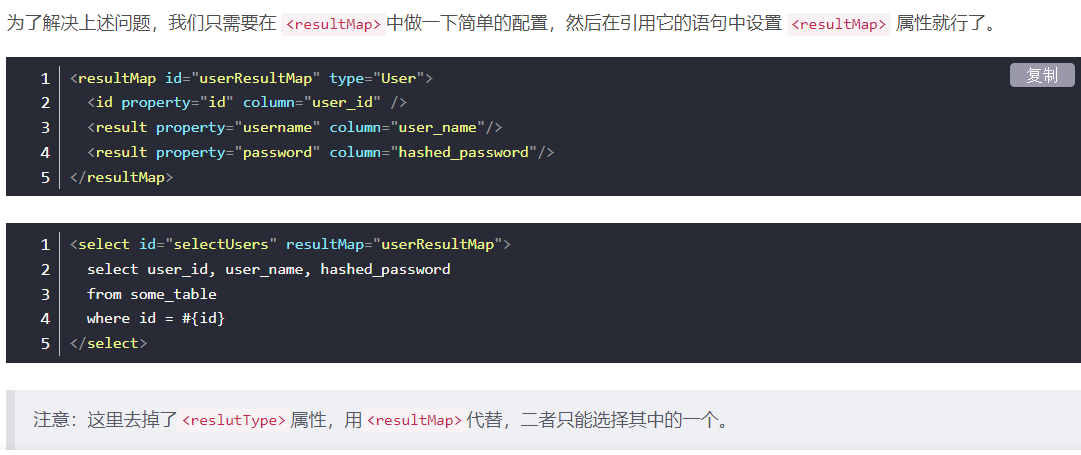
2.5 resultMap
2.6 sql
用于定义可重用的 SQL 代码片段,以便在多个SQL语句中使用。 参数可以静态地(在加载的时候)确定下来,并且可以在不同的 include 元素中定义不同的参数值。例:
<!-- 定义 -->
<sql id="userColumns"> ${alias}.userName,${alias}.userSex</sql>
<!-- 运用 -->
<select id="selectUserInfo" resultType="map">select<include refid="userColumns"><property name="alias" value="t1"/></include>,<include refid="userColumns"><property name="alias" value="t2"/></include>from user_info t1left join user_info_copy t2
</select>3.SQL动态标签
3.1 if
单个条件判断,用以实现条件筛选,例:
<select id="selectUserInfo" parameterType="map" resultType="map">select * from user_info where 1=1<if test="userSex !=null and userSex !='' ">and userSex=#{userSex}</if><if test="userName !=null and userName !='' ">and userName like CONCAT('%',#{userName},'%')</if>
</select>
PS:此处需要注意,如果参数值为数字int型,判断是否等于某个固定值时可能会导致判断失效,例如:
<if test="userFlag !=null and userFlag !='' and userFlag =='1'">……
</if>
可以修改为:
<!-- .toString()转换 -->
<if test="userFlag !=null and userFlag !='' and userFlag =='1'.toString()">……
</if>
或
<!-- 外层单引号,内部双引号 -->
<if test='userFlag !=null and userFlag !="" and userFlag =="1"'>……
</if>
3.2 foreach
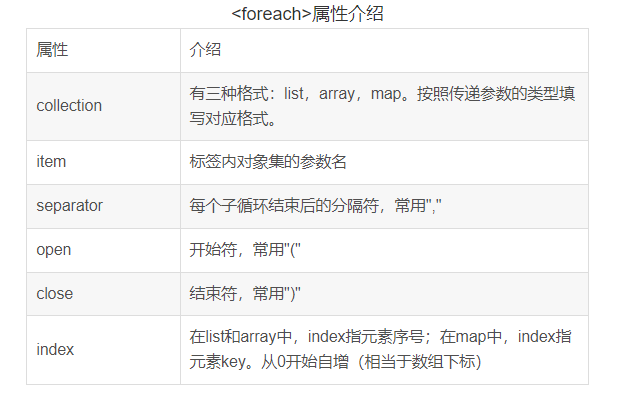
*open和close指在foreach标签头和尾添加指定内容,常见于IN和VALUES函数
3.2.1 批量插入表数据
INSERT INTO table (a, b, c, d) VALUES
<foreach collection = "list" item = "item" separatior = ",">(#{item.a}, #{item.b}, #{item.c}, #{item.d})
</foreach>/*执行Mybatis后的SQL语句示例*<foreach>在每个数据集间添加了','*/
INSERT INTO table (a, b, c, d) VALUES('a',123,true,'112456789'),('b',124,true,'112455789'),('c',125,false,'112466789'),('d',126,true,'112451789')
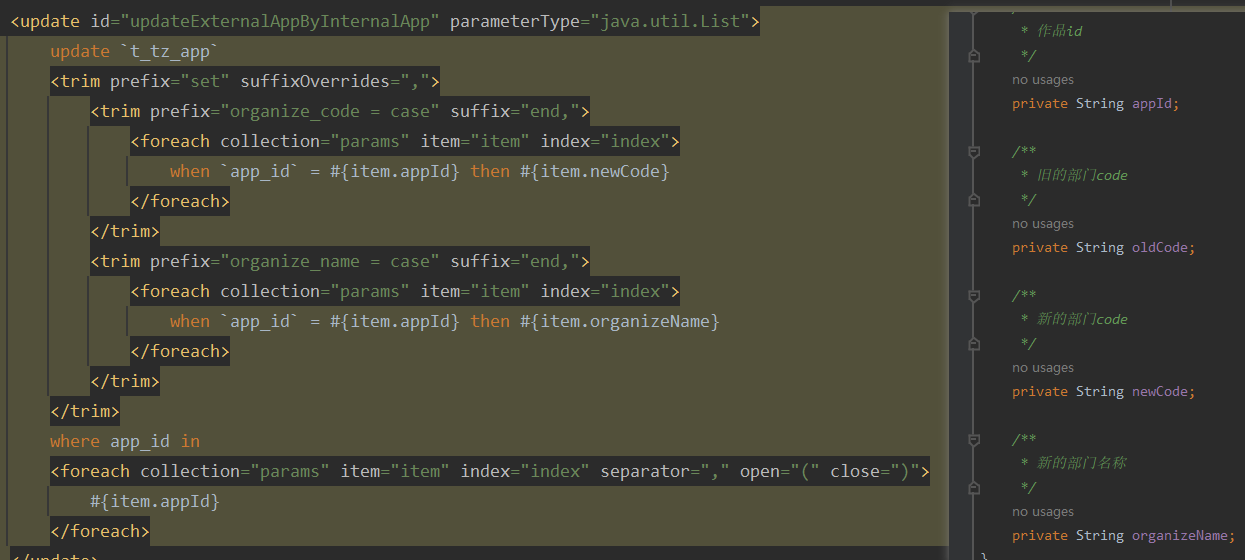
3.2.2 批量更新表数据
(1)单条件更新
UPDATE table SET b = '10'
WHERE a IN
<foreach collection = "list" item = "item" open = "(" close = ")" separator = ",">#{item.a}
</foreach>/*执行Mybatis后的SQL语句示例*单条件用到了IN函数*<foreach>在标签头尾添加了'(' ')',并在每个数据间添加了','*/
UPDATE table SET b = '10'
WHERE a IN ('ZBD12131','ZBD12132','ZBD12133')
(2)多条件更新
UPDATE table
SET a =
CASE
<foreach collection="list" item="item">WHEN b=#{item.b} AND c = #{item.c} THEN '10'
</foreach>
ELSE a END;/*执行Mybatis后的SQL语句示例*多条件批量更新用到了SQL语句中的CASE WHEN函数*/
UPDATE table
SET a =
CASE
WHEN b=123 AND c = true THEN '10'
WHEN b=124 AND c = true THEN '10'
WHEN b=125 AND c = false THEN '10'
WHEN b=126 AND c = true THEN '10'
ELSE d END;
复杂
3.2.3 批量查询表数据
(1)list单条件查询
SELECT * FROM table
WHERE a IN
<foreach collection = "list" item = "item" open = '(' close = ')' separator = ','>#{item.a}
</foreach>//执行Mybatis后的SQL语句示例
SELECT * FROM table
WHERE a IN ('ZBD123','ZBD124','ZBD125','ZBD126')
(2)list多条件查询
SELECT * FROM table
WHERE a = #{a}
AND
<foreach collection = "list" item = "item" open = '(' close = ')' separator = 'OR'>b = #{item.b} AND c = #{item.c}AND d = #{item.d}
</foreach>/*执行Mybatis后的SQL语句示例*多条件批量查询用到了SQL语句OR函数,视实际应用环境修改separator参数*/
SELECT * FROM table
WHERE a = '123'
AND (b=123 AND c = true AND d = 'ZBD123' ORb=124 AND c = true AND d = 'ZBD124' ORb=125 AND c = false AND d = 'ZBD125' ORb=126 AND c = true AND d = 'ZBD126'
)
3.3 choose/when/otherwise
用以实现条件的多种判断,类似与if else,例:
<select id="selectUserInfo" parameterType="map" resultType="map">select * from user_info where 1=1<choose><when test="userFlag!=null and userFlag!='' and userFlag=='Y'">and id<=100</when><when test="userFlag!=null and userFlag!='' and userFlag=='N'">and id <=200</when><otherwise>and id<=300</otherwise></choose>
</select>
3.4 where
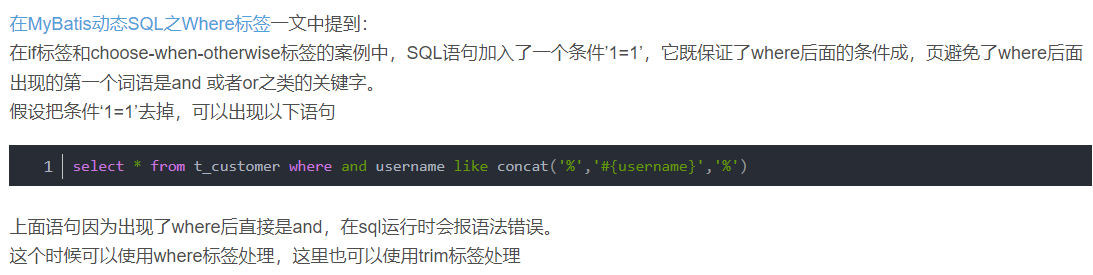
只会在子元素返回任何内容的情况下才插入 “WHERE” 子句,并且可以自动处理判断条件语句返回的第一个and或or,
例:不使用where标签时,若userSex为空,语法错误会报错:
<select id="selectUserInfo" parameterType="map" resultType="map">select * from user_info where<if test="userSex !=null and userSex !='' ">userSex=#{userSex}</if><if test="userName !=null and userName !='' ">and userName like CONCAT('%',#{userName},'%')</if>
</select>修改为:< where>
<select id="selectUserInfo" parameterType="map" resultType="map">select * from user_info<where><if test="userSex !=null and userSex !='' ">userSex=#{userSex}</if><if test="userName !=null and userName !='' ">and userName like CONCAT('%',#{userName},'%')</if></where>
</select>
自动转换为:select * from user_info where userName like ……
3.5 set
可以动态更新需要更新的列,忽略其它不更新的列,例:
<update id="updateUserInfo" parameterType="map">update  user_info<set><if test="userName!= null and userName!=''">userName=#{userName},</if>userSex=#{userSex}</set>where id=#{keyId}
</update>
3.6 trim
- trim标记是一个格式化的标记,主要用于拼接sql的条件语句(前缀或后缀的添加或忽略),可以完成set或者是where标记的功能。
| prefix | 给sql语句拼接的前缀 |
| suffix | 给sql语句拼接的后缀 |
| prefixOverrides | 指定去除多余的前缀内容,如:prefixOverrides=“AND OR”,去除trim标签内sql语句多余的前缀"and"或者"or" |
| suffixOverrides | 指定去除多余的后缀内容 ,去除sql语句后面的关键字或者字符, |
<trim prefix="前缀" suffix="后缀" prefixOverrides="忽略前缀字符" suffixOverrides="忽略后缀字符">SQL语句
</trim>
3.6.1 在select中
<select id="selectByNameOrHobby" resultMap="BaseResultMap">select * from student <trim prefix="WHERE" prefixOverrides="AND | OR"><if test="name != null and name.length()>0"> AND name=#{name}</if><if test="hobby != null and hobby.length()>0">AND hobby=#{hobby}</if></trim>
</select>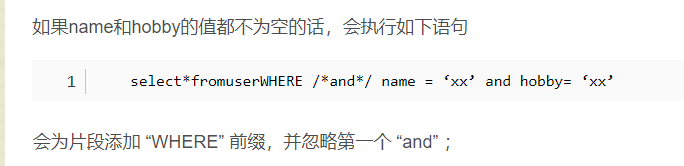
- 当然,避免出现“WHERE AND”还有其他方法,如where 1=1的查询条件
<!--将where提取出来,并加上“1=1”的查询条件 -->
select * from student where 1=1<trim suffixOverrides=","><if test="name != null and name != ''">and NAME = #{name}</if><if test="hobby != null and hobby != ''">and HOBBY = #{hobby}</if></trim>
3.6.2 用在insert中
<insert id="insert" parameterType="Object">insert into student <trim prefix="(" suffix=")" suffixOverrides=","><if test="name != null">NAME,</if><if test="hobby != null  ">HOBBY,</if></trim><trim prefix="values(" suffix=")" suffixOverrides=","><if test="name != null  ">#{name},</if><if test="hobby != null  ">#{hobby},</if></trim>
</insert>
3.6.3 在update中
<update id="updateByPrimaryKey" parameterType="Object">update student set <trim  suffixOverrides=","><if test="name != null">NAME=#{name},</if><if test="hobby != null">HOBBY=#{hobby},</if></trim> where id=#{id}
</update>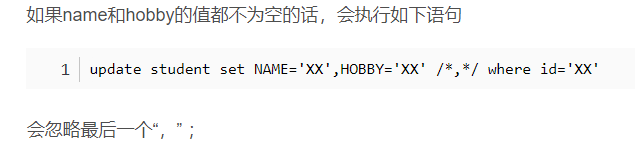
复杂